

HubSpot portal management

Your HubSpot portal won't manage itself

A rolling monthly service that keeps the portal you own clean and trusted. The monitoring is built in your account, the record is written every month, and you can leave with 30 days' notice.

A neglected portal is a liability, not an asset

HubSpot doesn't break all at once. It drifts. A property gets renamed, someone leaves, an integration disconnects, and a year later nobody trusts the pipeline.

x_brush_1

Data you can't trust

In one portal I was asked to look at, over 5,000 contacts had no owner and more than 2,000 belonged to people who had left the business years before.

x_brush_1

Workflows failing silently

Two live workflows were still assigning new records to those former staff, so leads went to inboxes nobody was reading.

x_brush_1

A system your team works around

Three generations of setup had left duplicate properties for the same thing. The team stopped trusting the reports and went back to spreadsheets.
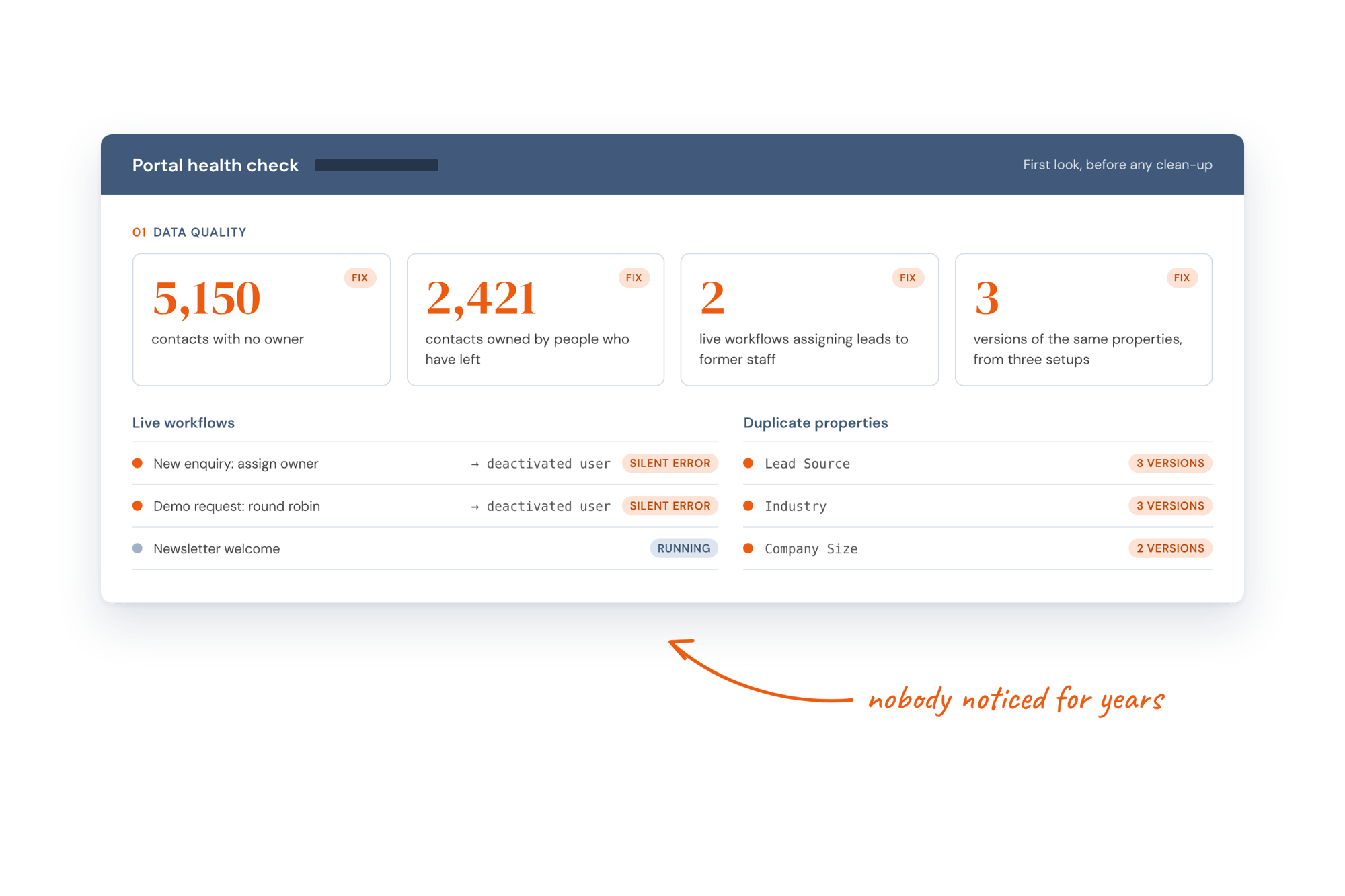
A HubSpot portal health check showing 5,150 contacts with no owner, 2,421 owned by people who have left, two workflows silently assigning leads to former staff and duplicate properties
What's included

Everything your portal needs to stay clean, every month

The upkeep is the same on every tier. What changes is how quickly I respond, how often we meet and whether you have support hours for the small things.

Book a call
check_brush_2

Maintain system integrity

Properties, lifecycle stages and pipelines are kept in line with your architecture, so the portal still works the way it was designed.

check_brush_2

Monitor workflow performance

Every live workflow is checked for errors and odd enrolments, so nothing fails without someone knowing.

check_brush_2

Manage contact hygiene

Duplicates merged, formatting fixed and records owned by people who have left reassigned, every month.

check_brush_2

Oversee integrations

Connected tools are checked so data keeps flowing in both directions, and any break is found and fixed.

check_brush_2

Handle minor improvements

On higher plans, the small jobs that would otherwise wait for a project, such as a new form, a property change or a board report, come out of your support hours.

check_brush_2

Monitoring you keep

A data quality dashboard and health report are built in your portal. They're yours whether or not you stay.

Think of it like website maintenance, but for your CRM

You wouldn't launch a website and never update it.

Your HubSpot portal is the same. Portal Management keeps the system running, so your team can get on with selling.
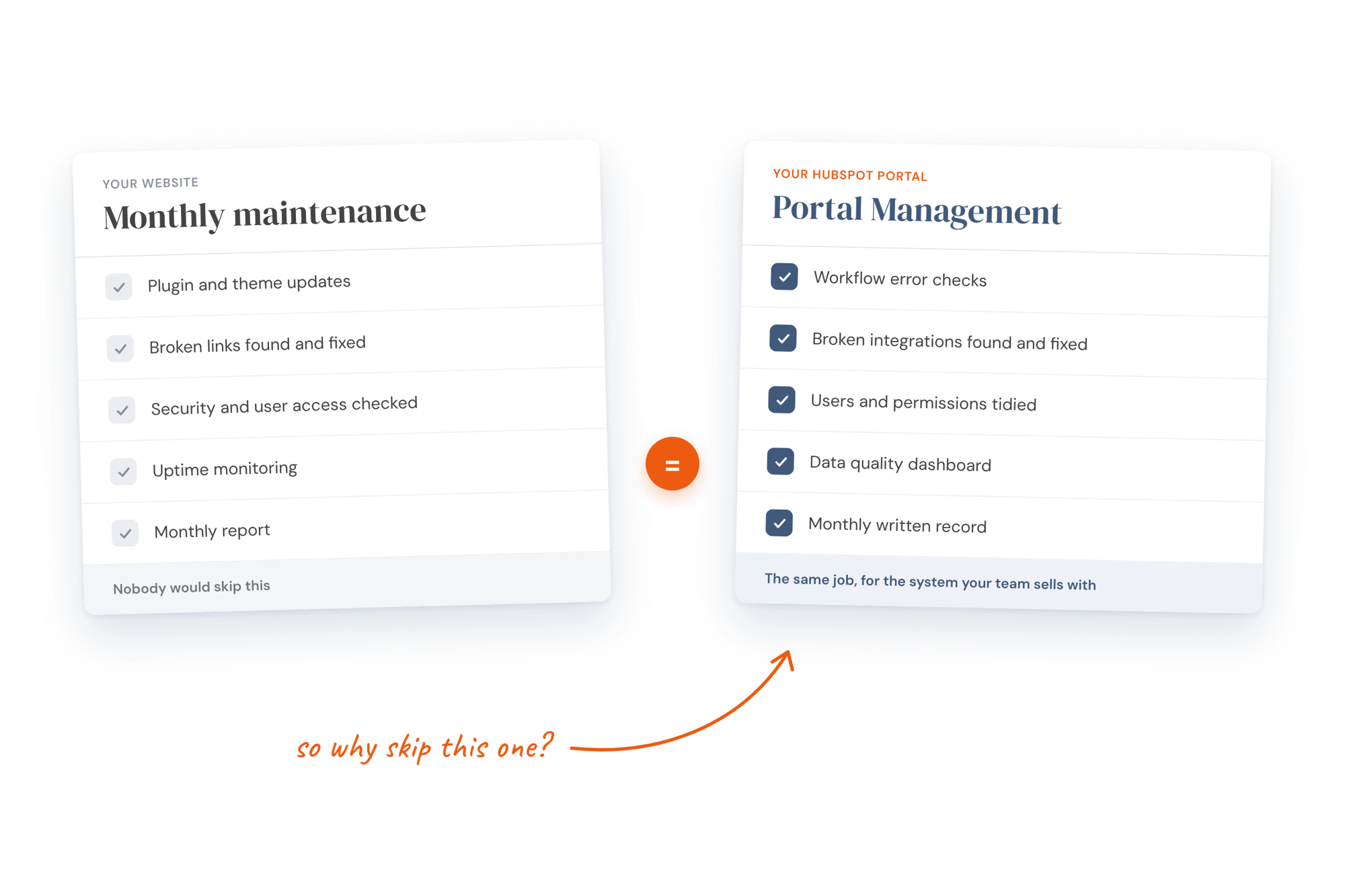
Two checklists side by side. Monthly website maintenance (plugin updates, broken links, security, uptime, monthly report) equals Portal Management (workflow error checks, broken integrations, users and permissions, data quality dashboard, monthly written record)
Who this is for

For teams with a well-built portal and nobody to look after it

This works best when the portal has been set up properly and the job now is keeping it that way.

It's a good fit when:

check_brush_2

You've just finished a HubSpot project. Your team has the maintenance guide but not the time to work through it every month.

check_brush_2

Your portal works, but nobody owns it. HubSpot is set up well enough, and you want it kept clean without giving someone internal another chore.

check_brush_2

You're hiring a HubSpot administrator. You need the portal looked after until they start, and want them to inherit monitoring that already runs.

check_brush_2

Small jobs keep piling up. A new form, a report for the board or a property change, without scoping a project each time.

Another option may suit you better when:

x_brush_1

Your portal needs rebuilding. If it was never set up properly, maintaining it just keeps the mess tidy. HubSpot Strategy & Implementation fixes the foundations first.

x_brush_1

I'm already your fractional marketing director. HubSpot upkeep is already included in your days.

x_brush_1

You have an administrator with the time. The maintenance guide shows them what to check each month, so you don't need to pay me to do it.

x_brush_1

You need a big change. A new hub, a new process or a major integration is a project, not a monthly job, and is scoped separately.

How it works

Set up once, then looked after every month

If I built your portal, there's no audit, because the architecture is the starting point. If not, I start with a short portal read. If it needs a rebuild, I'll tell you, and point you to that service instead of charging a management fee.

Pricing

How much does HubSpot portal management cost?

A fixed monthly fee for the upkeep, with optional support hours billed only when you use them. Rolling monthly, 30 days' notice, and invoiced in arrears on 30-day terms.

GBP (£) USD ($)

Core

For teams who own their portal and want it kept clean without thinking about it.

Most Popular

Growth

For teams who want upkeep plus a HubSpot specialist on hand for the small things, with a monthly review.

Partner

For teams who want full management: faster answers, a fortnightly review and a quarterly roadmap.

Monthly fee

£600

£900

£1,300

Monthly upkeep

Data clean (duplicates, formatting, ownership), workflow error checks, integration checks, user and permission tidy-up, and beta features switched on where they help. Theme and module updates if your website is on HubSpot. Duplicate checks, formatting, error checks and the monthly report run on AI routines in your account. I review and decide.

Reporting

Data quality dashboard and health report built in your portal, which stay if you leave. Written log of what was done, why, and what to watch

Response time

When issues arise, you skip the queue. I respond within two business days for all support queries, ensuring minimal disruption & faster resolution.

Review meeting

A focused 60-minute review session where we evaluate portal health, discuss priorities, & plan upcoming improvements, ensuring you’re always moving in the right direction.

Quarterly portal review

Every quarter, I conduct a full health & performance review of your HubSpot portal, highlighting opportunities to improve efficiency, automation, and ROI. You’ll receive actionable recommendations & a clear roadmap for the next quarter.

Dedicated Slack channel

A private Slack channel for fast communication, quick questions, & ongoing collaboration, giving your team direct access without waiting for scheduled calls.

Support hours

Flexible time each month for deeper HubSpot work, from campaign setup to report building, automation creation, or troubleshooting. Use it however your business needs to keep momentum high.

Monthly maximum

£600

£1,600

£2,700

Support hours: You pay for the hours you use, never for hours you don't, and the rate is the same on every tier.

My promise

Easy to start, easy to leave

If any support-hours work misses the mark, tell me within seven days. I'll redo it, and if it still isn't right, I'll refund it.

There's no minimum term. Give 30 days' notice whenever you like, and the monitoring stays in your account when you go.

Testimonials

Your options

How this compares with other ways to look after HubSpot

Every portal needs looking after. The question is who does it, what it costs and what you're left with if you stop.

A HubSpot Partner agency retainer

Agency retainers tend to keep you needing them, and the portal gets more complex to justify the fee.

Here the monitoring is in your account, every month is written down, and you can leave with 30 days' notice.

Hiring a HubSpot administrator

A part-time admin usually costs more than Partner, needs managing and inherits a portal they didn't design.

If you hire one later, they start with monitoring that already runs.

HubSpot's own support

HubSpot looks after the platform, not your setup. Nobody there knows what your lifecycle stages mean or why a workflow exists.

Doing nothing

A portal left alone for a few years ends up with thousands of unowned contacts and workflows sending leads to people who have left. Fixing that costs more than years of upkeep.

Why choose me?

Right-sized HubSpot management

Most HubSpot agencies are built to sell licences and keep you on a retainer. I'm not. There are no account managers, no upselling and no complexity added to justify the fee. I look after your portal because I understand how it supports the way you win customers.

The monitoring lives in your account, not mine. The aim is a portal your own administrator could take over tomorrow.

HubSpot Solutions Partner Program Gold Badge

Questions about HubSpot Portal Management

What is HubSpot Portal Maintenance?

A rolling monthly service that keeps your HubSpot portal clean and working. I check data, workflows, integrations and users every month, fix what's wrong and send you a written record of what was done.

Why does a HubSpot portal need managing?

Because it changes every day. New contacts, new staff, renamed properties and updated integrations all add small problems, and without regular checks they build up until nobody trusts the reports.

What happens if a HubSpot portal isn't looked after?

It drifts. In one portal I looked at, over 5,000 contacts had no owner and two live workflows were still sending new leads to people who had left.

Isn't this the kind of retainer you argue against?

The retainers I argue against sell you skills you never get to keep. This one sells time. You already own the portal, the architecture and the maintenance guide, the monitoring is built in your account, and you can leave any month with 30 days' notice.

Doesn't HubSpot maintain the portal itself?

HubSpot looks after the platform, not your setup. Nobody at HubSpot knows what your lifecycle stages mean, why a workflow exists or which integrations matter to you.

Is Portal Management proactive or reactive?

Proactive. The checks run every month whether or not anything looks wrong, so problems are found before they reach your reports or your customers.

Is this different from HubSpot consultancy?

Yes. Consultancy and implementation design and build the portal. Portal Management keeps that portal working the way it was designed, month after month.

Is this the same as having a HubSpot administrator?

It covers much of the same work for less than a part-time administrator costs. If you hire one later, they take over monitoring that already runs, with a written history of every month.

Do you manage every HubSpot hub?

Yes. All hubs are covered, along with the tools connected to them.

Do you work with businesses outside the UK?

Yes. Portal Management is done entirely remotely, so it works wherever your team is based.

How much does HubSpot Portal Management cost?

Core is £600 a month, Growth is £900 and Partner is £1,300. Growth and Partner can add support hours at £70 an hour, billed only when used.

What's the difference between Core, Growth and Partner?

The monthly upkeep is the same on every tier. Growth adds a monthly review, a written quarterly review, next-day responses, a Slack channel and up to 10 support hours. Partner adds fortnightly reviews, a live quarterly review with a roadmap, same-day responses and up to 20 support hours.

How do support hours work?

On Growth and Partner, you can use up to 10 or 20 hours a month for small jobs, at £70 an hour. Hours are invoiced as used, up to your tier's limit, so there's nothing to roll over and you never pay for hours you didn't use.

What's the most we'll pay in a month?

£600 on Core, up to £1,600 on Growth and up to £2,700 on Partner. Those maximums only apply if you use every support hour.

Is there a minimum term?

No. Every tier is rolling monthly with 30 days' notice.

When are we invoiced?

Monthly in arrears, on 30-day terms, so you pay for each month after it's done. Support hours appear on the same invoice, with the time used shown on your monthly record.

Can we change tier later?

Yes, in either direction with a month's notice. If you never use your hours, I'll suggest Core. If you keep reaching the limit, I'll suggest Partner or a separate project.

Is there a set-up fee?

No. Building the monitoring and the first full clean are included in your first month's fee.

Can we pay in US dollars?

Yes. Core is $800, Growth $1,225 and Partner $1,750 a month, with support hours at $95 an hour.

What isn't included in the fee?

HubSpot licences, which you pay to HubSpot directly, and larger pieces of work such as a new hub, a rebuild or a major integration. Those are scoped as separate projects.

What's included in HubSpot Portal Management?

Every month: a data clean, workflow error checks, integration checks, a user and permission tidy-up and a written record. The monitoring itself is built in your portal and stays there.

Do you clean up duplicate contacts?

Yes. Duplicates are merged, formatting is fixed and records owned by people who have left are reassigned every month, following rules we agree at the start.

Do you check our workflows?

Yes. Every live workflow is checked for errors and unusual enrolments, so nothing fails without someone knowing.

Do you monitor our integrations?

Yes. Connected tools are checked so data keeps flowing in both directions, and any break is found and fixed.

What's the monitoring you build in our account?

A data quality dashboard and health report in your portal, showing unowned contacts, duplicates, missing fields, workflow errors and contacts owned by deactivated users. You can check it any time, and it stays if you leave.

What does AI do each month, and what do you do?

AI runs the checks in your account: finding duplicates, fixing formatting, spotting workflow errors and drafting the monthly report. I review what it finds, decide what to fix, make the changes that need judgement and write the record.

What's in the monthly record?

What was found, what was fixed and why, what to watch, and the support hours used. It's kept in your workspace, so you always know what you're paying for.

Do you update our website theme and modules?

Yes, if your website is built on HubSpot. Theme and module updates are part of the monthly upkeep on every tier.

What counts as a small job for support hours?

Anything that would otherwise wait for a project: a new form, a property change, a report for the board or a workflow for a new process.

What's in the quarterly review?

A look at how the portal has performed over the quarter, what has drifted from the original design and what to change next. Growth gets it in writing. Partner gets a live session and a roadmap for the next quarter.

How does Portal Management start?

With a 45-minute session to agree the rules, such as who owns unassigned contacts and who gets alerts. In the first month, I build the monitoring, do the first full clean and send your first monthly record.

Do we need to have done the implementation project first?

No. If I didn't build your portal, I start with a short portal read. If it needs rebuilding rather than maintaining, I'll recommend HubSpot Strategy & Implementation instead of charging a management fee.

What if our portal is already a mess?

Most portals are messy when I first see them. If the first clean can sort it, we start managing it straight away. If the structure itself is wrong, I'll tell you it needs rebuilding first.

What access do you need?

Super admin or partner access to your portal, and a named person on your side for questions.

How quickly will you respond to requests?

Within two business days on Core, the next business day on Growth and the same day on Partner.

How often will we meet?

Core has no meetings, just the written record. Growth has a monthly review and Partner has a review every two weeks.

We already have a HubSpot partner. Can you work alongside them?

You shouldn't need two. If your partner already maintains the portal well, you don't need this. If they don't, this can replace that part of what you pay them for.

How quickly can we start?

Usually within one to two weeks. If I built your portal, we can start straight from the hand-over.

What happens to the monitoring if we stop?

It stays. The dashboard, health report and checks are built in your portal, so they keep running after you leave. The final monthly record shows the state of the portal on the day you go.

What if we need a bigger change?

A new hub, a new process or a major integration is a project, not a monthly job. I'll scope it separately, and the monthly management carries on alongside it.

What results can we expect?

Data your team trusts, workflows that don't fail quietly and reports that reflect what's really happening. You'll see the numbers move on the data quality dashboard each month.

How quickly will we see a difference?

In the first month. The first full clean fixes most existing problems, and the first record gives you a baseline to measure against.

Will this make our reporting more accurate?

Yes. Most reporting problems come from bad data, such as missing owners, duplicates and broken lifecycle stages, and that's what the monthly upkeep fixes.

Will our team use HubSpot more?

Usually. People stop working around a system once they trust what's in it.

Who is Portal Management best suited to?

B2B businesses with a well-built HubSpot portal and nobody with the time to look after it. It suits teams who want it kept clean without a full-time administrator.

When isn't it the right fit?

When your portal needs rebuilding, when your own administrator has the time to follow the maintenance guide, or when I'm already your fractional marketing director, where HubSpot upkeep is included in your days.

We're hiring a HubSpot admin. Is this still useful?

Yes, until they start. The portal stays clean in the meantime, and your new admin inherits monitoring that already runs, with a written history of every month.

Do we need technical staff in-house?

No. You need someone who can answer questions about how you work, not someone who knows HubSpot.

Does it work on any HubSpot plan?

Yes. It works on Starter, Professional and Enterprise, across any combination of hubs.

What's the first step?

Book a call. We'll talk about the state of your portal and agree whether it needs managing, or rebuilding first.

Start here

Keep the portal you built clean

Monthly management for a HubSpot portal you own, with the monitoring in your account and 30 days' notice to leave.