


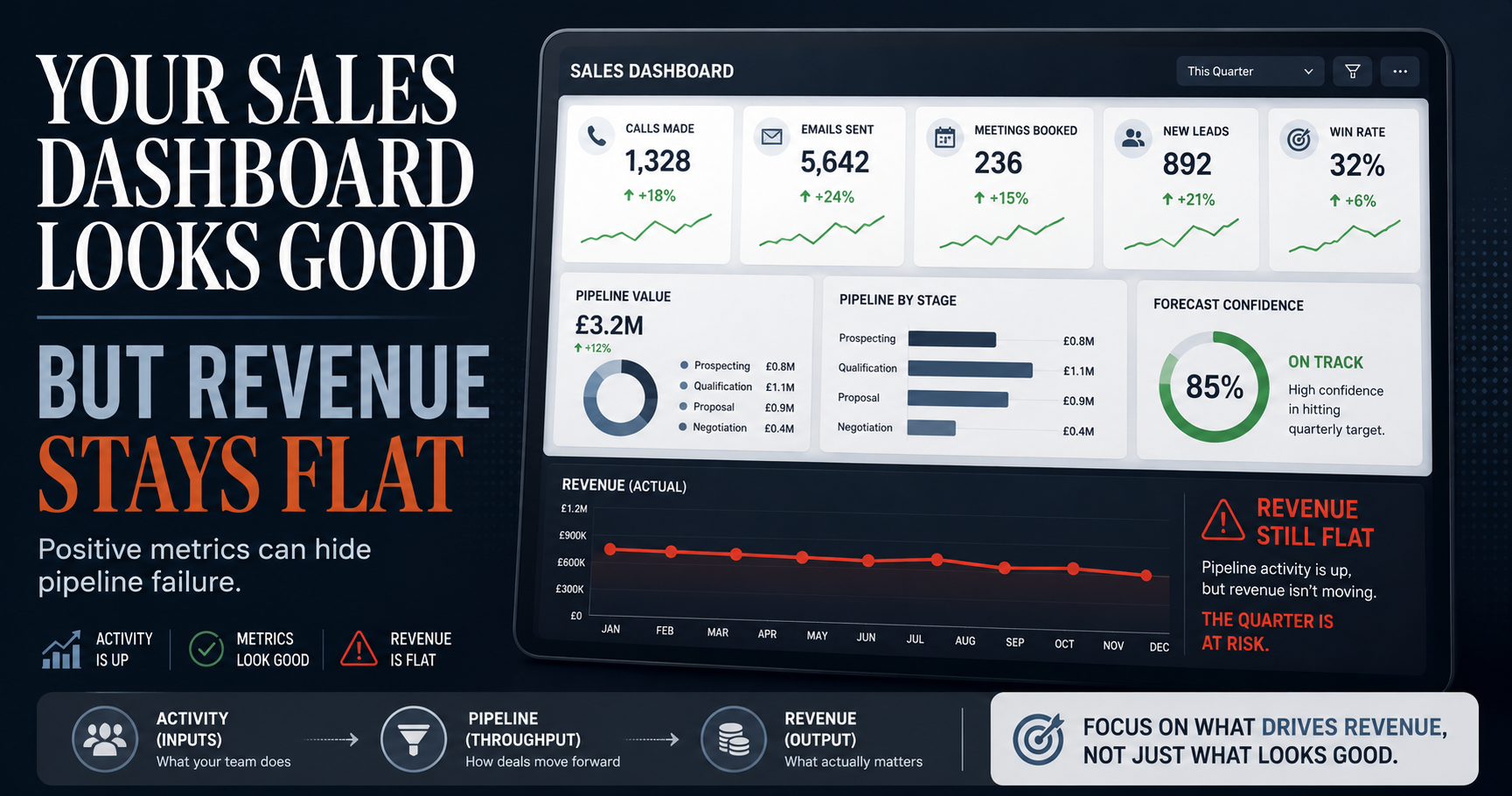
Does your sales dashboard show green across the board, but your revenue figures tell a completely different story? And have you ever sat in a pipeline review feeling confident, only to close the quarter short, with no clear moment when the warning signs were visible?
If you have ever committed to a forecast that did not close, or spent weeks coaching activity volume while pipeline quietly stalled, this article is for you.
Across more than a decade working inside both agency and in-house environments, I have diagnosed this exact reporting failure in businesses from £2m to £50m ($2.5m to $62.5m), and the pattern is consistent. The dashboard is rarely broken. It is measuring the wrong things.
This article will show you why that happens, which metrics actually predict revenue, and how to audit and restructure your reporting in a matter of hours, starting today.
Key Takeaways
- A sales dashboard can look healthy and still be useless if it tracks activity metrics (inputs) rather than revenue-correlated KPIs (outputs).
- Vanity metrics, including calls logged, total leads, and email open rates, trend upward without predicting whether a deal will close.
- The most damaging effect of a misleading dashboard is timing: by the time lagging indicators show a problem, the quarter is already lost.
- Fixing a sales dashboard costs between £0 and £25,000+ ($0–$31,250+), depending on whether you reconfigure your CRM or commission a full BI build.
- A structured dashboard audit takes two to four hours and can be completed within your existing CRM platform at no additional cost.
What is a sales reporting dashboard?
A sales reporting dashboard is a visual interface that consolidates key sales metrics, such as pipeline value, deal stage, activity volume, and conversion rates, into a single, real-time or near-real-time view.
At its best, it gives you a decision-making tool. At its worst, it becomes a professionally formatted distraction that obscures what is actually driving or stalling your revenue.
A typical dashboard tracks:
- Pipeline value and deal stage distribution
- Activity volume (calls, emails, meetings booked)
- Conversion rates between stages
- Quota attainment
- Forecast vs. actuals
The problem is not the dashboard itself. The problem is which of these metrics sit at the centre of it.

Why a good-looking dashboard does not always mean better sales
A dashboard can look healthy because it is measuring the wrong things, tracking inputs like calls made and emails sent rather than outputs like qualified opportunities created.
This is the central misconception: visual polish and green status indicators create a feeling of control that is not backed by metrics which actually predict whether a deal will close.
[Insert infographic contrasting activity metrics vs. outcome metrics, with examples from each column]
If every metric on your dashboard measures what your team did rather than what resulted from it, your dashboard is a productivity tracker, not a revenue tool.
How dashboard design choices hide the real story
Dashboards are often built to impress stakeholders rather than drive decisions. Large numbers, like total leads, total calls, total pipeline value, look authoritative on a slide. But without context on quality or conversion, they are decorative.
See how agencies exploit this same principle in: How Digital Marketing Agencies Use Vanity Metrics to Hide Poor Performance.
Vanity metrics vs. actionable KPIs: what is the difference?
Vanity metrics are data points that trend upward and feel positive but have no reliable correlation with closed revenue.
Actionable KPIs are metrics you can directly influence and that have a demonstrated link to sales outcomes.
Common vanity metrics found on sales dashboards:
- Total leads generated
- Email open rate
- Number of calls logged
- Pipeline volume (without velocity)
- Proposals sent
- Website sessions attributed to outbound activity
Revenue-correlated KPIs to prioritise:
- Stage-to-stage conversion rate
- Pipeline velocity (speed at which deals move through stages)
- Average sales cycle length
- Deal slippage rate (deals pushed past expected close date)
- Forecast accuracy against actuals
- Average deal size by source or segment

Replacing even two or three vanity metrics with revenue-correlated KPIs will change the quality of every sales conversation you have.
What problems does a misleading dashboard actually cause?
A misleading dashboard creates at least four compounding business problems: delayed pipeline diagnosis, misaligned sales coaching, false forecast confidence, and under-resourced deals that quietly go cold.
The most damaging of these is timing. By the time a dashboard built on lagging or vanity indicators shows a problem, corrective action cannot save the quarter.
- Delayed diagnosis: Activity metrics stay green while deal progression stalls. Nobody investigates until targets are missed.
- Misaligned coaching: Managers coach on call volume rather than conversion quality, reinforcing the wrong behaviour.
- False forecast confidence: Leadership commits to revenue based on pipeline volume rather than pipeline health.
- Deals going cold unnoticed: Without slippage rate or velocity tracking, at-risk deals are invisible until they are already lost.
How much does it cost to fix or rebuild a sales dashboard?
Fixing a sales dashboard ranges from zero additional cost, if you are reconfiguring existing CRM reports — to £5,000–£25,000+ ($6,250–$31,250+) for a full BI-tool build or third-party analytics integration.
For most SMEs already on HubSpot, Salesforce, or Pipedrive, the majority of high-value improvements can be made within the existing platform at no extra licence cost.

NOTE: Cost figures are estimates based on typical UK market rates in 2025. Actual costs will vary by provider and scope.
How to audit your sales dashboard: a step-by-step process
Auditing your sales dashboard starts with one question for every metric currently displayed: "If this number changed tomorrow, would it change a decision we make?"; if the answer is no, the metric does not belong on your primary view.
A structured audit takes two to four hours and moves through five stages:
- Metric inventory: List every metric currently visible on your primary dashboard.
- Revenue-correlation test: For each metric, identify whether it has a proven link to deals closing. Flag those that do not.
- Data source validation: Confirm each metric pulls from a reliable, current source. Broken CRM data produces misleading results even from the right metrics.
- Stakeholder alignment: Agree with sales leadership which metrics will drive decisions. A dashboard nobody acts on is decoration.
- Dashboard redesign: Restructure the primary view around revenue-correlated KPIs. Move activity metrics to a secondary reporting layer.
How to prioritise which metrics to keep, move, or remove
For each metric, apply this three-way decision:
- Keep: Revenue-correlated, decision-driving, and reliably sourced
- Move to secondary view: Useful context, but not a primary decision trigger
- Remove: Vanity metric, duplicate, or unreliably sourced
I can run this audit as part of a structured diagnostic session. See the 90-Minute Marketing Triage™ for details.
Best metrics and tools for a sales dashboard that actually drives revenue
The best sales dashboards are built around five core revenue-correlated metrics: pipeline velocity, stage conversion rate, average deal size, sales cycle length, and forecast accuracy against actuals.
The five metrics worth tracking on your primary view:
- Pipeline velocity: How fast deals move through stages, measured in days per stage
- Stage-to-stage conversion rate: The percentage of deals that progress from each stage to the next
- Average deal size: Useful for spotting whether opportunity quality is improving or declining
- Sales cycle length: A lengthening cycle often signals a qualification or nurturing problem upstream
- Forecast accuracy: Compares committed forecast against closed revenue; low accuracy signals a pipeline health issue
On tooling: HubSpot Sales Hub, Salesforce Sales Cloud, and Pipedrive cover most SME-to-mid-market reporting needs natively. Power BI and Looker Studio are better suited when you need to pull data across multiple departments or data sources.
-
Recommend reading: HubSpot's guide to sales reporting
Disclosure: I am a HubSpot Gold Partner, which means I have a commercial relationship with HubSpot. That said, the recommendation above is based on what I have consistently seen work at the SME-to-mid-market level, the platform genuinely suits most businesses in that range.
If you are on HubSpot and your reporting does not yet reflect these metrics, the issue is almost always configuration rather than the platform itself. See: HubSpot Strategy & Implementation for how to build reporting that reflects your actual sales process.
Frequently asked questions about sales dashboards
The most common questions about sales dashboards centre on why metrics look positive while revenue lags, which KPIs actually predict performance, and how often reporting should be reviewed.
How often should a sales dashboard be reviewed or updated?
Weekly for pipeline and activity metrics. Monthly for trend analysis on cycle length, deal size, and forecast accuracy. Quarterly for a full audit of which metrics remain decision-relevant.
What is pipeline velocity and why does it matter?
Pipeline velocity measures how quickly opportunities move through your sales stages. A slowing velocity signals stalled deals before they are formally lost. A simple formula: (Number of opportunities x Win rate x Average deal size) ÷ Sales cycle length.
Can adding more metrics to a dashboard fix the problem?
No. More metrics rarely improve clarity; they usually reduce it. The fix is removing what does not drive decisions, not layering in more data. This connects directly to a broader pattern explored in: The Lead Gen Lie: Why Your Agency's MQL Obsession Is Killing Your Sales.
What is the single most important sales metric to track?
Stage-to-stage conversion rate. It is the clearest leading indicator of where deals are being won or lost inside your process, and the one most likely to reveal a structural problem before a quarter is already gone.
Conclusion
You came here because your dashboard was telling you one thing and your revenue was telling you another.
That gap is not a data problem. It is a structural one. The dashboard itself is not broken; it is simply measuring the wrong things, which is a decision that was made at setup and rarely revisited.
The good news is that the fix is within reach. A two-to-four-hour audit using the framework above will tell you exactly which metrics to keep, which to move, and which to remove. For most businesses, that single session changes the quality of every pipeline conversation that follows.
Now that you have a framework for diagnosing it, the decision is whether to run the audit yourself using the steps above, or bring in an external review to pressure-test your reporting setup with fresh eyes. If you want a structured second opinion, the 90-Minute Marketing Triage™ is designed exactly for that, a focused diagnostic that identifies what your current reporting is hiding and what to do about it.
How to take action now:
- Apply the "would this change a decision?" test to every metric on your current dashboard
- Replace the bottom three vanity metrics with revenue-correlated alternatives from the list above
- Validate your CRM data sources before drawing conclusions from any revised report
- Restructure your primary view around the five core KPIs outlined in this article
Book a 90-Minute Marketing Triage™ if you want a structured, external diagnosis of your reporting and pipeline setup
See how I help businesses build clear, decision-driving reporting through HubSpot Strategy & Implementation.

About the author
Tom Wardman is a fractional marketing consultant and Growth Independence Architect™ who helps founder-led B2B businesses replace agency dependency with self-sufficient growth systems. With experience across both agency and in-house environments, Tom specialises in building marketing and sales infrastructure that is measurable, owned, and built to last. He is the author of Build a Trusted Brand, the creator of the In-House Growth Engine™, and one of the UK's first five certified Endless Customers coaches. Visit tomwardman.com to explore services or book a call.
Pricing disclaimer: All GBP–USD price conversions are rounded estimates based on a rate of £1 = $1.25 and correct at the time of publishing. Exchange rates fluctuate and figures should be treated as indicative only.
